用vue3 写了个上传组件列表,支持取消上传,展示进度条
最近写了个上传附件组件,回想起来之前单位有个功能模块,也是差不多文件上传功能(支持取消、支持删除、支持显示进度条),然后被同事写的是乱七八糟。维护起来非常费劲,简直就是我的眼中钉,肉中刺,一直想把这段代码给拔掉。这次刚好遇到了相似的功能,咱们就从组件设计以及实现一起来看看,怎么实现一个文件上传附件的功能!

- 支持文件上传 (这个肯定要支持某些文件根据自己的业务需求限制)
- 支持文件列表删除
- 支持显示附件上传进度条
- 支持上传中的附件取消
组件设计
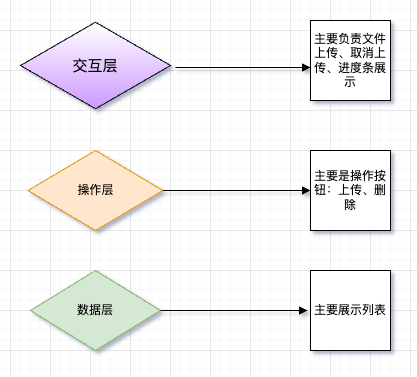
咱们先来划分组件设计,以及职责划分。如下图咱们共划分为3个模块:交互层、操作层、数据层。
模块划分示意图:
模块交互示意图:
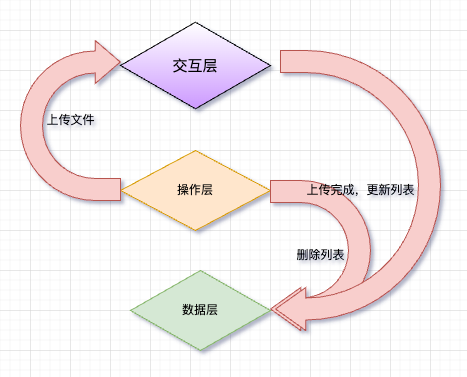
其实这么划分组件已经能很清晰看明白每个组件要做什么了!那么咱们的文件目录划分如下:
bash
├── index.vue
├── list.vue
├── operator.vue
├── options.js
└── running
    ├── index.vue
    ├── item.vue
└── progress.vueindex.vue负责载各个组件list.vue负责展示上传的文件列表operator.vue负责展示操作按钮(上传、删除)options.js就放了个uuid和convertFileSize转换大小的函数running文件夹中主要负责上传文件,取消文件,展示进度条
相关实现
咱们就来分析下具体实现细节:
- 显示进度条以及支持取消相关功能具体如下:
进度条以及支持取消 running下item.vue代码 :
js
import { ref } from "vue";
import axios from "axios";

const percent = ref(0); // 记录百分比
const CancelToken = axios.CancelToken; // 取消上传
const axiosCancel = ref(null);

const uploadFile = () => {
  const formData = new FormData();
  formData.append("file", props.file);

  axios
    .post(`你自己的API`, formData, {
      headers: {
        "Content-Type": "multipart/form-data",
      },
      cancelToken: new CancelToken(function executor(c) {
        axiosCancel.value = c;
      }),
      onUploadProgress: (progressEvent) => {
        // 这里能计算出来上传的百分比
        if (progressEvent.lengthComputable) {
          percent.value = Math.round(
            (progressEvent.loaded / progressEvent.total) * 100,
          );
        }
      },
    })
    .then(() => {
      percent.value = 100;
      setTimeout(() => {
        // 完成
        emits("success", props.uuid);
      }, 300);
    })
    .catch((error) => {
      if (axios.isCancel(error)) {
        console.log("Request canceled", error.message);
      } else {
        console.log(error);
      }
    });
};

const oncancel = () => {
  axiosCancel.value?.();
  isCancel.value = true;

  setTimeout(() => {
    // 取消
    emits("cancel", props.uuid);
  }, 300);
};- 上传中数据删除、新增逻辑
runningUploadFiles
- 上传完成后删除
- 取消后删除
- 新选文件后新增
新增 index.vue代码 :
vue
<template>
  <div class="work-flow-attachment">
    <WorkFlowAttachmentRunning
      v-model="runningUploadFiles"
      :formId="formId"
      @complate="onComplate"
    />
    <WorkFlowAttachmentOperator
      :uploadFiles="uploadFiles"
      :deleteFiles="deleteFiles"
    />
    <WorkFlowAttachmentList
      ref="listRef"
      :formId="formId"
      v-model="checkData"
    />
  </div>
</template>

<script setup>
import { defineProps, ref } from "vue";
import { Confirm } from "@/components/pro-confirm/index.js";
import WorkFlowAttachmentOperator from "./operator.vue";
import WorkFlowAttachmentRunning from "./running/index.vue";
import WorkFlowAttachmentList from "./list.vue";

import { deleteAttachmentApi } from "@/api/attachment.js";
import { generateUUID } from "./options";

const ATTACHMENT_TYPE = {
  VIEW: "view",
  EDIT: "edit",
};

defineProps({
  formId: {
    type: String,
    default: "",
  },
  size: {
    type: String,
    default: "middle", // middle、small
  },
  type: {
    type: String,
    default: "edit", // edit、view
  },
});

const listRef = ref(null);
const runningUploadFiles = ref([]);
const checkData = ref([]);

const uploadFiles = (files) => {
  files.forEach((file) => {
    runningUploadFiles.value.push({
      // 新增任务
      file,
      uuid: generateUUID(),
    });
  });
};

const deleteFiles = () => {
  if (!checkData.value.length) {
    Confirm.error("请至少选中一项数据");
    return;
  }

  Confirm.warning({
    content: "是否删除选中数据?",
    async confirm() {
      await deleteAttachmentApi({
        ids: checkData.value.join(),
      });
      onComplate();
    },
  });
};

const onComplate = () => {
  listRef.value?.reload?.();
};
</script>

<style lang="less" scoped>
.work-flow-attachment {
  padding: 12px 24px;
}
</style>上传完成和上传取消(利用v-model=""语法糖更改runningUploadFiles数据):
running 下 index.vue代码
vue
<template>
  <div class="work-flow-attachment-running">
    <AttachmentRunningItem
      v-for="item in modelValue"
      :key="item.uuid"
      v-bind="item"
      :formId="formId"
      @cancel="onCancel"
      @success="onSuccess"
    />
  </div>
</template>

<script setup>
import { defineProps, defineEmits } from "vue";
import AttachmentRunningItem from "./item.vue";

const emit = defineEmits(["update:modelValue", "complate"]);

const props = defineProps({
  modelValue: {
    type: Array,
    default: () => [],
  },
  formId: {
    type: String,
    default: "",
  },
});

// 清除数据
const onCancel = (uuid) => {
  emit(
    "update:modelValue",
    props.modelValue.filter((item) => item.uuid !== uuid),
  );
};

// 完成
const onSuccess = (uuid) => {
  onCancel(uuid);
  emit("complate");
};
</script>

<style lang="less" scoped>
.work-flow-attachment-running {
  > div:last-child {
    margin-bottom: 16px;
  }
}
</style>- 删除列表相关实现也是利用**
v-model="" 语法糖更新checkData数据:**
list.vue代码:
vue
<template>
  <div class="work-flow-attachment-list">
    <div
      v-for="(item, idx) in listData"
      :key="idx"
      class="attachment-list__item"
    >
      <ProCheckbox v-model="listData[idx].check" @change="onCheckboxChange">
        <span
          class="attachment-list__item--content"
          @click.stop="onDownload(item.id)"
        >
          <span class="attachment-list__item--title">
            <span>{{ item.name }}</span>
            <span>[{{ item.size }}]</span>
          </span>

          <span
            class="attachment-list__item--operator"
            @click.stop="onDownload(item.id)"
          >
            <a-tooltip placement="top">
              <template #title>
                <span>下载</span>
              </template>
              <download-outlined />
            </a-tooltip>
          </span>

          <span
            class="attachment-list__item--operator"
            v-if="isVerifySupportPreview(item.name)"
            @click.stop="onPreview(item.id)"
          >
            <a-tooltip placement="top">
              <template #title>
                <span>预览</span>
              </template>
              <folder-view-outlined />
            </a-tooltip>
          </span>
        </span>
      </ProCheckbox>
    </div>
  </div>
</template>

<script setup>
import {
  defineProps,
  onMounted,
  ref,
  defineEmits,
  defineExpose,
  watch,
} from "vue";
import ProCheckbox from "@/components/pro-checkbox/index.vue";
import { getAttachmentListApi } from "@/api/attachment.js";
import { convertFileSize } from "./options";

const isSupportPreview = [
  ".png",
  ".ofd",
  ".xls",
  ".xlsx",
  ".jpg",
  ".doc",
  ".docx",
  ".pdf",
];

const emit = defineEmits(["update:modelValue", "complate"]);
const props = defineProps({
  formId: {
    type: String,
    default: "",
  },
  modelValue: {
    type: Array,
    default: () => [],
  },
});

const listData = ref([]);

const isVerifySupportPreview = (name = "") => {
  return isSupportPreview.some((item) => name.endsWith(item));
};

watch(
  () => props.formId,
  () => {
    getData();
  },
);

const getData = async () => {
  if (!props.formId) return;
  const response = await getAttachmentListApi({ formId: props.formId });

  listData.value = (response?.result || []).map((item) => {
    return {
      name: item.fileName,
      suffix: item.fileSuffix,
      id: item.id,
      size: convertFileSize(item.totalSpace),
      check: false,
    };
  });
};

const onDownload = (id) => {};

const onPreview = () => {};

const reload = getData;

const onCheckboxChange = () => {
  emit(
    "update:modelValue",
    listData.value.filter((item) => item.check).map((item) => item.id),
  );
};

onMounted(getData);

defineExpose({
  reload,
});
</script>

<style lang="less" scoped>
.work-flow-attachment-list {
  .attachment-list__item {
    margin-top: 8px;
  }

  .attachment-list__item--content {
    .attachment-list__item--title {
      &:hover {
        color: #3080f8;
      }
    }

    .attachment-list__item--operator {
      font-size: 16px;
      &:hover {
        color: #3080f8;
      }
    }

    span {
      margin-right: 4px;
    }
  }
}
</style>
总结
组件设计好,职责划分明确后在进行编码能使代码更好维护,更利于迭代。 咱们在划分完成后只关心数据
runningUploadFiles以及checkData处理就行了。希望这个文章对你来说能学习到:
- 文件进度条获取
- 文件上传取消
- 利用
v-model语法糖使代码数据流转更便捷清晰 - 数据模块的设计划分